Tuesday, May 19, 2009

CompuServe Classic E-Mail: The Next Generation


As CompuServe Classic readies for its final log off on June 30, CompuServe Member Services has thrown the switch on a migration utility that allows Classic members to keep their e-mail accounts alive.

Gone will be CompuServe Classic's old number-comma-number e-mail address format and in its place will be a standard POP3 e-mail address with the familiar "@" sign. Many CompuServe Classic users already have alternate POP3 addresses for their accounts. Those addresses will be preserved in the transition. Just don't expect to connect to the Internet through a CompuServe dial-up number after June 30--those are on their way out too.

CompuServe Classic members must convert to the new e-mail system by going to the CompuServe Mail Center by June 30. Here's what happens once they get there:


You can start the conversion process by logging in with a Classic numerical e-mail address or with the alternate POP3 access information.


Once you click "continue" on the screen above, the next one asks for some basic demographic information and offers you a chance to pick a new password.


From there you need to agree to the Terms of Service by typing in the letters that appear in the image box.

If everything goes well, you'll get the following welcome screen.


Finally, clicking the right button takes you to your new inbox.


As for accessing the new e-mail service with Outlook or another e-mail client, you'll need the new server settings. You can retrieve your e-mail as a POP3 or IMAP account with or without a secure connection (SSL). The port setting is found in the advanced settings section of Outlook and other e-mail clients.

The POP3 settings are:
POP: pop.csi.com port 110 (SSL = port 995)
SMTP: smtp.csi.com port 587

The IMAP settings are:
IMAP: imap.csi.com port 143 (SSL = port 993)
SMTP: smtp.csi.com port 587

So how did it work on my CompuServe Classic account? So far so good, but other users have reported some problems.

What about you?

Copyright 2009 Stadium Circle Features

Wednesday, May 06, 2009

Kindle DX: A Spark on the Paper Trail?


The debut of Amazon.com's Kindle DX electronic book reader Wednesday breathed a little fresh air into the hopes of the newspaper industry. Just a little, but it was a refreshing breath just the same.

Newspaper moguls have been scratching their collective heads for a solution to their dwindling readership and ad revenue numbers and the concept of an electronic book platform that the masses could embrace has been an elusive dream.

The Kindle DX, with its 9.7-inch, 16-gray-scale E-ink display and impossibly slim 0.38-inch profile, goes a long way in providing an electronic book reader that's as usable for textbooks and technical documents as it is for reading newspapers and blogs. But no, it doesn't go all the way.

The Kindle DX supports Adobe PDF documents in addition to its native format and can download entire books wirelessly in about a minute. Its 3.3 gigabytes of available storage is enough for 3,500 books. The $489 device won't be available until this summer, but Amazon.com is already taking orders.


At a well-attended press event at Pace University, which includes a Park Row building which was once home to the New York Times, Amazon.com CEO Jeff Bezos (above) said the new Kindle DX is meant to blend into the background, letting the user focus on the content.

"It gets out of the way so that you can enter the author's world," said Bezos amid the clicking, clacking and clunking of Twittering journalists and trigger-happy photographers. "It doesn't beep at you. It doesn't get warm in your hands."

Bezos noted that newspapers have been "an absolute best seller on Kindle." Readers can adjust the screen font and the number of words in each line and the unit automatically reorients the text if you turn the unit on its side or upside down.

Bezos said that paper survives today because it provide a better reading experience that most computer screens. "Paper is better. It's worth the hassle of printing," he said.


However he said the Kindle's low-glare paper-like display is easy enough on the eyes that eyestrain is not an issue.

The New York Times, the Washington Post and the Boston Globe have signed on to deliver content to the Kindle DX and to sell the $489 unit at a discount -- in exchange for a long-term newspaper subscription. The units would be available in areas outside of a paper's delivery zone.

"This experiment ... demonstrates our commitment to reinvention," said Arthur O. Sulzberger Jr., chairman of the New York Times Co. He said the Kindle DX combines "the immediacy of the Web with the portability and depth of the newspaper."

Students at Pace as well as at Princeton University, Case Western Reserve University, Arizona State University, Reed College and Darden School of Business at the University of Virginia will get first crack at the units through a trial program, said Bezos. Amazon.com has also inked agreements with major textbook publishers, he said.

So will the Kindle DX signal the beginning of a new generation of electronic book readers that are user friendly enough to be embraced by the public as well as those still willing to advertise in newspapers? Now there's a big "Maybe."

What do you think?

Text and top and bottom photos Copyright 2009 Stadium Circle Features
Middle photo courtesy of Amazon.com

Wednesday, April 15, 2009

It's Over! CompuServe Classic is Closing


CompuServe Classic, the legendary online service that once dominated the industry, will close June 30 after 30 years in cyberspace. CompuServe 2000, a newer iteration of the service, will remain online.

Long outdistanced by newer rivals and long neglected since its acquisition by America Online, its membership has dwindled to a relatively insignificant number of cyberdinosaurs -- including myself. My CompuServe Classic account dates to 1985; six years after CompuServe's online services for personal computer users debuted in 1979. CompuServe itself was founded in 1969.

While CompuServe Classic's passing won't affect too many Web surfers, it will indeed close a major chapter in the evolution of cyberspace. I'll miss my old numerical address: 72407,3343.

Below is the text of the closing announcement.

So long, old friend.

-----Original Message-----

From: CompuServe Member Services
Sent: Wednesday, April 15, 2009 4:18 PM
To:
Subject: Important CompuServe Classic Account Notification

Dear CompuServe Classic Member,

After many years of providing online services, we regret to inform you that as of June 30, 2009 the CompuServe Classic service will no longer operate as an Internet Service Provider. We hope this does not cause you an inconvenience.

Note that this shutdown only relates to the CompuServe Classic service. The CompuServe 2000 service will continue to operate as it does today.

We're aware that this change may raise several questions for you.
Here's what this will mean:

DO YOU NEED AN INTERNET SERVICE PROVIDER?

* If you need dial-up Internet access, there are two options you may wish
to consider.

Netscape Internet Service (as low as $9.95 per month)
+ Includes 1 month FREE trial!
+ Unlimited dial-up access
http://www.getnetscape.com

AOL ($11.99 per month)
+ Includes 1 month FREE trial!
+ Unlimited dialup access
+ 24/7 tech support
+ McAfee security software
+ Unlimited email storage
http://free.aol.com/tryaolfree/index3.adp?promo=804302&service=aol


ACCESS AND BILLING INFORMATION:

* The last day you will be able to access your CompuServe Classic account will be June 30, 2009. Your dial-up access will no longer be available after this date.

* We urge you to immediately forward, back up, move or otherwise copy to a location outside the CompuServe Classic system any stored data you wish to keep. This data will be inaccessible after the CompuServe Classic service is closed on June 30.

* The CompuServe Classic Ourworld "homepage" service
(http://ourworld.compuserve.com) will also close on June 30. After that date, you will be unable to access or retrieve any images, files, or other material stored in the Ourworld service. Any content you wish to retain must be saved to a new location before June 30.

* Your final monthly charge for the CompuServe Classic service will occur on your June billing date.


EMAIL AVAILABILITY:

* We are creating a new email system where you will be able to continue
using your existing CompuServe Classic email address. This new email
service will be available to you at no charge - but you will need to
provide your own Internet access.

* Some of the benefits of the new email system include:

+ Unlimited storage lets you keep as many messages as you want
+ Ability to receive large messages (up to 16MB per message)
+ Industry leading spam and virus protection to help eliminate
threats and hassles
+ Mail filters that allow you to store and organize mail
+ Open accessibility and compatibility with IMAP & POP3
+ Seamless integration w/ AIM for instant messaging

* The transition to the new mail system will occur in mid-May. More
information will be sent to you shortly concerning the migration
of your mailbox to the new CompuServe Classic mail system.


ADDITIONAL QUESTIONS?

Member Services phone support will remain available for the
CompuServe 2000 service, and can answer any billing questions
about CompuServe Classic.

Should you have questions about the termination of this service,
please contact CompuServe Member Services at:

Tech Support
1-800-848-8990
8 a.m. - 1 a.m. EST, Mon - Fri
10 a.m. - 10 p.m. EST Sat and Sun

Billing Support
1-800-848-8990
10 a.m. - 10 p.m. EST, Mon - Sat
Closed Sundays and all major U.S. Holidays

We thank you for being a CompuServe Classic member over the past years.

Sincerely,


CompuServe Member Services

Monday, February 02, 2009

Tempting Tech for Tough Times

Wallets are thinning and so are the head counts at major corporations, but there are still some nifty products out there that make us want to spend the little we have or at least dream about it. Take the LG-GD910 Watch Phone (above) from LG Electronics. It's a gadget Dick Tracy could be proud of.


Text Copyright 2009 Stadium Circle Features
Images courtesy of LG Electronics

Friday, January 09, 2009

Palm Pre: Preview to a Palm comeback?

The 2009 International Consumer Electronics Show is in full swing in Las Vegas right now (I'm not there this year) and so is the inescapable blizzard of press releases, Twitter tweets and other flashes from the show floor.

While there are plenty of nifty new devices that make good use of today's technologies, there are not many product announcements that have made a major ripple so far.

One notable exception, however, is Palm Inc.'s new Palm Pre smartphone. Like Apple's iPhone, the Pre has a touchscreen, but unlike the iPhone, it also has a slide-down QWERTY keyboard.

Palm has authored a new operating system for the new phone: Palm webOS. Like the Android software developed by Google for T-Mobile's G1 smartphone, webOS is an open platform, which bodes well for seeing nifty applications for the Pre from independent software developers.

The Pre has a 3.1-inch touchscreen, a 3-megapixel digital camera, GPS, Wi-Fi, Bluetooth, a Web browser, e-mail and instant-messaging software, eight gigabytes of data space and some preinstalled applications. It will be available from Sprint later this year and support the carrier's 3G high-speed data network. No pricing has been announced yet, however.


Like any Palm device, a lot of time has been put into developing the unit's calendar and contact list applications. The phone merges data from different sources to make it easier to manage. For example, if you have the same person listed in the contact list on your computer and on your Gmail contact list, the phone will detect that it's the same person and provide just one listing for that person on the phone. The Pre can run multiple applications at once and allows you to flip quickly between them.

It's been a while since Palm has created this much buzz for a new product. The announcement of the Pre sparked a boost in Palm's stock price. It remains to be seen if this unit will have the necessary level of user-friendliness and reliability to make a dent in a market dominated by Research in Motion's Blackberry devices.

Is the Pre for you? Why or why not?

Text Copyright 2008 Stadium Circle Features
Images courtesy of Palm Inc.

Tuesday, December 16, 2008

AFL Cancels 2009 Season: Wanna Buy a Ticket?


The Arena Football League announced Monday (Dec. 15) that it would cancel its 2009 season and reorganize the league. As of Tuesday morning, however, it seems that word hasn't even reached the right side of the league's own Web site.

Copyright 2008 Stadium Circle Features

Friday, December 12, 2008

Google Chrome: Color it gold

When Google first announced it was introducing a new Web browser called Chrome, I thought the same thing you might have: Why bother?

After using it for three months, however, I can say this: It's now my default Web browser.

Why? Because it basically delivered on its promises. For example, a crash in one tabbed window doesn't bring down the whole browser -- just the misbehaving tab -- just as Google promised. 

On Thursday Google took Chrome out of "beta" status and declared it golden -- a finished product. 

To be sure, the early public beta product had its share of holes where bugs and gremlins could find safe refuge. For example, the earlier versions had problems with parts of Facebook.

I like the smooth way in which tabs can be grabbed and reordered in Chrome and I like the way you can drag a tab away and create a new window and then grab that new window and bring it back into your tab lineup. It seems fast enough, and, yes, stable enough for everyday use.

Of course it's not perfect. Other browsers do certain things better. For example, Firefox has a handy, one-step "Undo Close Tab" command which quickly brings back Web pages you may have closed by mistake. Yes, you can recover closed tabs in Chrome via the the "Recently Closed Tabs" listing that pops up when you open a new tab, but it takes a few extra clicks.

And of course there are those Web pages that absolutely, positively demand Microsoft Internet Explorer, so you'll always need to keep that handy on your computer.

One thing you may have a problem with is making Chrome your default browser through Chrome's options settings. When you open up the options in Chrome, you may find that the "Default Browser" setting is grayed out and can't be changed.

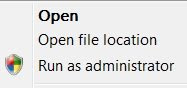
In that case, assuming that you're running Windows Vista, try this: Close Chrome. Instead of double-clicking on the Chrome icon on your desktop or elsewhere, click the right mouse button. In the dialog window that pops up, select "Run as Administrator."

Once Chrome reopens, go back to the options page and the "Default Browser" setting should be unlocked and clickable. 

No Chrome isn't perfect, but it's mighty good for a one-day-old browser.

What do you think?

Copyright 2008 Stadium Circle Features

Wednesday, November 19, 2008

PC Magazine to end print edition

According to an exclusive story posted on PaidContent.Org, Ziff-Davis Media is closing the print version of PC Magazine. The last print run of the magazine, which dates back to 1982, will be the January 2009 edition, according to the story. The magazine, and its staff, will continue online, however, according to PaidContent.Org.

I was the senior writer at PC Magazine from 1993 to 1998 and remember the days when the magazine actually turned away advertising because the printer couldn't physically fit any more pages into the magazine. The dull thud of a 500-plus-page edition of PC Magazine hitting the bottom of a mailbox has been a distant memory as more recent editions have struggled to stay above 100 pages.

While PC Magazine will apparently continue on the Web, it's indeed the end of an era.

Thursday, October 16, 2008

T-Mobile G1: A promising disappointment

Apple's iPhone has nothing to worry about from T-Mobile's new G1. At least not at the moment.

After a week with the T-Mobile G1, the first with Google's new Android operating system, I find myself both elated and disappointed. The G1 offers some nifty features and some of the first Android applications are impressive, but the unit has enough glitches and bugs to make me think twice about using it as my primary phone -- for the moment.

A major irritation was the POP3 e-mail client, the one which allows you to add e-mail services other than Google's own Gmail, which is handled separately -- and smoothly. The e-mail software couldn't open common attachments like Microsoft Word files (the Gmail client can) and it also pulled an irritating disappearing act. 

Three times I carefully entered the details of my Prodigy/Yahoo, AOL and AT&T e-mail accounts and three times the phone ate them all, leaving me with nothing but a friendly invitation to start the e-mail setup wizard again.

Fortunately the phone defaults to a setting in which mail is never actually deleted from the server, thus allowing you to download it again later. Word to the wise: Don't change this setting. At the moment I've entered only two e-mail accounts and the G1's memory seem to be holding for the moment.

Speaking of disappearing acts: While the keyboard on the brown version (white and black are also available) of the G1 is very easy to read in bright light or in low light (thanks to backlighting), in moderate light the letters actually disappear into the silver keys as the backlighting kicks in, forcing you to tilt the phone until you can read the characters.

The contacts list is very clear and readable, but sorts entries on a person's first name. If you have a contact entry with a company name and a phone number, but no person, the entry shows up as a phone number. If your entry just has a company and an e-mail address, it shows up as "unknown." 

To be fair, the phone handles the basics well. Sound quality is good, the touch screen is responsive, the Web browser is nice, and most menus are clear and easy to activate. With Wi-Fi, GPS and Bluetooth wireless adapters built in, the phone could be a very productive tool for a busy traveler. 

For example, the GPS, when combined with the preinstalled Google Maps Web link, makes for a handy companion for walkers. On a recent trip to a New York suburb that I was not familiar with, I was able to map my location and find a local public library -- where I wrote this blog post.

The G1's link to Amazon's digital music site was smooth and the link to YouTube worked well, except that the videos appear blocky and murky at times. The connection to T-Mobile's new 3G high-speed data network worked well when it was available, but the phone frequently reported back with "connection error" when trying to download e-mail.

The good news is that many of the phone's glitches could be resolved with software upgrades; which I hope are forthcoming. History will note that the iPhone endured a number of software updates before all of its functions stabilized.

With both a touch screen and a keyboard, the T-Mobile G1 is an impressive phone with the potential to be a true iPhone competitor. The potential is in the Android software, so keep an eye on new Android-compatible applications and tools and on how swiftly the phone's software issues are addressed with updates.

The G1 will arrive at T-Mobile stores Oct. 22. The phone will be $179 with a two-year T-Mobile contract, and of course the phone is locked to the T-Mobile service for now.

So what do you think? Let me know.

Copyright 2008 Stadium Circle Features
Photo courtesy of T-Mobile

Wednesday, October 08, 2008

Accoona: Business search engine goes out of business


It started with quite a bit of fanfare in 2006, but the business-centric Accoona search engine turned off its lights this week, blaming too much competition in the search engine market.

When it launched in March 2006 with a big media event at the United Nations in New York, former President Bill Clinton made a video sales pitch and chess champion Garry Kasparov made an appearance. Also present was the new chairman of Accoona Corp., none other than Eckhard Pfeiffer, former CEO of Compaq Computer.

Accoona's home page (see above) was clean and uncluttered and the search engine offered some nifty features, like the ability to quickly filter a long list of data by a person's name or the name of a company. Unfortunately, Accoona apparently couldn't market itself loud enough to be heard above the roar of Google, Yahoo and the other major search engines. 

Accoona's going-away message was short and to the point:

"Dear Accoona search users,

Due to an overwhelmingly competitive search market, Accoona.com and Accoona.cn will no longer be active.

We thank you for your previous support.

Sincerely,

Accoona Management"

Copyright 2008 Stadium Circle Features