Showing posts with label Google. Show all posts

Thursday, October 07, 2010

Logitech Revue: After All the Buzz, Will It Take Flight?

At a well-attended press conference Wednesday, Logitech showed off its Revue, the first in what will probably be a litany of Google-powered TV devices that will let you view content from the Web, broadcast and application sources on a simple TV interface.

Kevin Simon, Logitech
At $300, the Revue comes with a nifty thin wireless keyboard controller with a touch pad (held in the photo by Kevin Simon, director of product marketing for Logitech's digital home group) and runs on Google's Android operating system with Google's Chrome Web browser.

Also available is a sharp-looking, backlit mini controller ($130) or you can operate the Revue with your Android phone or iPhone once you've downloaded a free app from the Android Market or iTunes App Store.

Logitech Revue mini controller
At the press conference Junien Labrousse, Logitech's executive vice president for products, said the Revue would make it simple for TV viewers to find and watch their favorite programs no matter where the content came from.

"Imagine having all your favorite content at your fingertips," he said. "The magic with the Logitech Revue is that everything just works."

Preorders are being taken now but the unit won't arrive at Amazon and Best Buy until the end of the month.

So what are the details on the new Revue? See my piece at PC World.

Journalists jammed the Oct. 6 Logitech Revue press conference in New York.
Text and photos Copyright 2010 Stadium Circle Features

Wednesday, July 08, 2009

T-Mobile myTouch 3G: Google Android Take 2

Make it work, make it mine, make it easy: Those are the three customer wishes T-Mobile aims to fulfill with its new flagship smartphone: the myTouch 3G .
The touchscreen smartphone, manufactured by HTC and based on the same Google Android operating system software as the T-Mobile G1, offers a slimmer profile than the G1 thanks to its lack of a slide-out keyboard.
Highlights of the new unit include its large library of Android applications and the multitude of ways in which it can be personalized.
"It's a very sleek device," said T-Mobile Chief Marketing Officer Denny Marie Post (above, left), who readily admitted that her 15-year-old son was instrumental in helping her set up her phone. "You feel very bold to experiment with it.... It becomes 100% you."
"This is our first, and our real big bet for 2009," said Cole Brodman, T-Mobile's chief technology and innovation officer (above, right) at the July 8 press event in New York. "The myTouch 3G is unique through and through."

Brodman said there were already 5,000 Android applications available for the myTouch 3G and the G1, including many location-aware utilities that take advantage of the GPS receivers built into the phones.

For example, Sherpa, from Geodelic Systems, can locate points of interest close to you as you move around. Clicking a restaurant button will generate icons for the closest eateries, complete with the addresses and the distances from where you are. Click on an icon and the phone searches for relevant information on the restaurant, such as menus, travel directions, cuisine and reviews.

Rahul Sonnad, founder and CEO of Geodelic, said Sherpa was first developed for PCs, but was ported to Android as the software platform gained traction.

Brodman described Sherpa as a "really unique recommendation and discovery engine. He noted that it remembers the user's preferences as it processes requests. "The more you use it, the smarter it becomes," he said.

Brodman said T-Mobile's sales force had been trained to help users set up and personalize their myTouch 3G phones. "Make it work, make it mine and make it easy," said Brodman, taking the role of a prospective customer.

Current T-Mobile customers can pre-order the myTouch 3G for $199 with a 2-year service plan. Those who order by July 28 will receive their units by Aug. 3. The unit will be available in T-Mobile stores Aug. 5. The myTouch 3G offers a 3.2-inch touchscreen, aWi-Fi adapter, a 3.2-megapixel digital camera, a digital music player with a preinstalled four-gigabyte microSD memory card and support for T-Mobile's fast 3G data network.

After few minutes of testing, the phone worked well. The touchscreen was responsive and the Web browser rendered pages fairly quickly. The on-screen keyboard, which can be set up to give tactile feedback when a key is touched, flips over to the side when the phone is held in landscape orientation.

Post said the myTouch 3G was poised to be a viable challenger to Apple's iPhone to date. Time will tell.

Text and photos Copyright 2009 Stadium Circle Features

Friday, December 12, 2008

Google Chrome: Color it gold

When Google first announced it was introducing a new Web browser called Chrome, I thought the same thing you might have: Why bother?

After using it for three months, however, I can say this: It's now my default Web browser.

Why? Because it basically delivered on its promises. For example, a crash in one tabbed window doesn't bring down the whole browser -- just the misbehaving tab -- just as Google promised. 

On Thursday Google took Chrome out of "beta" status and declared it golden -- a finished product. 

To be sure, the early public beta product had its share of holes where bugs and gremlins could find safe refuge. For example, the earlier versions had problems with parts of Facebook.

I like the smooth way in which tabs can be grabbed and reordered in Chrome and I like the way you can drag a tab away and create a new window and then grab that new window and bring it back into your tab lineup. It seems fast enough, and, yes, stable enough for everyday use.

Of course it's not perfect. Other browsers do certain things better. For example, Firefox has a handy, one-step "Undo Close Tab" command which quickly brings back Web pages you may have closed by mistake. Yes, you can recover closed tabs in Chrome via the the "Recently Closed Tabs" listing that pops up when you open a new tab, but it takes a few extra clicks.

And of course there are those Web pages that absolutely, positively demand Microsoft Internet Explorer, so you'll always need to keep that handy on your computer.

One thing you may have a problem with is making Chrome your default browser through Chrome's options settings. When you open up the options in Chrome, you may find that the "Default Browser" setting is grayed out and can't be changed.

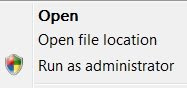
In that case, assuming that you're running Windows Vista, try this: Close Chrome. Instead of double-clicking on the Chrome icon on your desktop or elsewhere, click the right mouse button. In the dialog window that pops up, select "Run as Administrator."

Once Chrome reopens, go back to the options page and the "Default Browser" setting should be unlocked and clickable. 

No Chrome isn't perfect, but it's mighty good for a one-day-old browser.

What do you think?

Copyright 2008 Stadium Circle Features

Thursday, October 16, 2008

T-Mobile G1: A promising disappointment

Apple's iPhone has nothing to worry about from T-Mobile's new G1. At least not at the moment.

After a week with the T-Mobile G1, the first with Google's new Android operating system, I find myself both elated and disappointed. The G1 offers some nifty features and some of the first Android applications are impressive, but the unit has enough glitches and bugs to make me think twice about using it as my primary phone -- for the moment.

A major irritation was the POP3 e-mail client, the one which allows you to add e-mail services other than Google's own Gmail, which is handled separately -- and smoothly. The e-mail software couldn't open common attachments like Microsoft Word files (the Gmail client can) and it also pulled an irritating disappearing act. 

Three times I carefully entered the details of my Prodigy/Yahoo, AOL and AT&T e-mail accounts and three times the phone ate them all, leaving me with nothing but a friendly invitation to start the e-mail setup wizard again.

Fortunately the phone defaults to a setting in which mail is never actually deleted from the server, thus allowing you to download it again later. Word to the wise: Don't change this setting. At the moment I've entered only two e-mail accounts and the G1's memory seem to be holding for the moment.

Speaking of disappearing acts: While the keyboard on the brown version (white and black are also available) of the G1 is very easy to read in bright light or in low light (thanks to backlighting), in moderate light the letters actually disappear into the silver keys as the backlighting kicks in, forcing you to tilt the phone until you can read the characters.

The contacts list is very clear and readable, but sorts entries on a person's first name. If you have a contact entry with a company name and a phone number, but no person, the entry shows up as a phone number. If your entry just has a company and an e-mail address, it shows up as "unknown." 

To be fair, the phone handles the basics well. Sound quality is good, the touch screen is responsive, the Web browser is nice, and most menus are clear and easy to activate. With Wi-Fi, GPS and Bluetooth wireless adapters built in, the phone could be a very productive tool for a busy traveler. 

For example, the GPS, when combined with the preinstalled Google Maps Web link, makes for a handy companion for walkers. On a recent trip to a New York suburb that I was not familiar with, I was able to map my location and find a local public library -- where I wrote this blog post.

The G1's link to Amazon's digital music site was smooth and the link to YouTube worked well, except that the videos appear blocky and murky at times. The connection to T-Mobile's new 3G high-speed data network worked well when it was available, but the phone frequently reported back with "connection error" when trying to download e-mail.

The good news is that many of the phone's glitches could be resolved with software upgrades; which I hope are forthcoming. History will note that the iPhone endured a number of software updates before all of its functions stabilized.

With both a touch screen and a keyboard, the T-Mobile G1 is an impressive phone with the potential to be a true iPhone competitor. The potential is in the Android software, so keep an eye on new Android-compatible applications and tools and on how swiftly the phone's software issues are addressed with updates.

The G1 will arrive at T-Mobile stores Oct. 22. The phone will be $179 with a two-year T-Mobile contract, and of course the phone is locked to the T-Mobile service for now.

So what do you think? Let me know.

Copyright 2008 Stadium Circle Features
Photo courtesy of T-Mobile

Wednesday, September 24, 2008

T-Mobile G1: Android Alert!

So what's the big deal about the new T-Mobile G1 cell phone with the touch screen and flip-open keyboard? Yes it supports 3G and GPS and has a nifty flip-open, five-row keyboard, a usable trackball and a responsive touch screen, but we've seen all of this before, right?

Right. But that's OK. It wasn't the phone that was the star of Tuesday morning's well-attended T-Mobile/Google press conference in New York, it was Google's new Android phone operating system, a software platform destined to make major ripples in the smartphone market.

The difference between Android and other platforms like Microsoft's Windows Mobile, is that Android's code and software development kits (SDKs) are available free to software developers, thus allowing them to create innovative applications at a lower cost.

As the first phone to use Android, the T-Mobile G1 is temporarily in a class by itself, the only phone able to use the dozens of applications already written for Android.

Tuesday's press event was held under the Queensborough Bridge at Gustavino's, a high-ceilinged restaurant located about as far east as one can go in Manhattan without getting wet, but that didn't stop dozens of journalists from piling in for a first look at the new phone and operating system.

The phone features a 3.2-inch display, a 3.2-megapixel camera, a microSD card slot (a one-gigabyte card is included) and Bluetooth 2.0 wireless networking support.

One nifty Android application is ShopSavvy, a utility that allows you to scan product barcodes with the G1's camera, send the data over the Internet, and get a list of stores that sell that product. Thus you could walk into Store A, check the price of a product on the shelf, scan the bar code and have the phone report back with prices for the same product at other stores.

Of course Google applications and services such as Gmail, Google Calendar, YouTube and Google Maps are fully supported by the T-Mobile G1.

The phone, while offering a partially iPhone-like experience, does not aim to be a direct competitor in all aspects. It has no headphone jack and can't handle protected iTunes files, although it can play MP3s and other music formats.

As the last big cell phone carrier in the U.S. to build out a third-generation (3G) data network, T-Mobile now has a trendy phone that makes good use of it. It supports T-Mobile's HSDPA and EDGE data networks and has Wi-Fi support as well. It can even switch between Wi-Fi and the data networks depending on where the better throughput is.

The T-Mobile G1 costs $179 with a two-year service agreement. An unlimited data plan with 400 free messages is $25 per month. For $35 per month, both Web access and messaging are unlimited. The G1 will be available Oct. 22, but can be preordered now.

For more information, see the T-Mobile G1 Web site.

Text and last photo Copyright 2008 Stadium Circle Features
Other graphics courtesy of T-Mobile and Google.

Wednesday, September 03, 2008

Google Chrome: So far, so ... whoops!


The birth of a new Web browser sponsored by an Internet power as muscular as Google Inc. is no minor footnote in the history of the Web. The debut of Google Chrome on Sept. 2 sent almost audible shock waves through cyberspace. 

Remember, it was only in March that America Online ended support for Netscape, the legendary browser early Web surfers cut their teeth on. As it leaves the maternity ward, Google Chrome enters a space already crowded by Microsoft Corp.'s Internet Explorer, the Mozilla Foundation's Firefox, Opera Software's Opera browser and Apple Inc.'s Safari.

Will it make room for itself? Things look promising. 

The good news, at first blush, is that Google Chrome is, as advertised, a snappy, fast and clean-looking browser.

The bad news is that it's still a beta (unfinished) product. There are some irritations you'll run into with the new browser, but chances are good that the problems will be cleared up soon given the size of the Google Chrome development team.

For example, while using the "new" Facebook, I was unable to trigger some links like "Go Online" and "Back to the old Facebook." I couldn't even leave a comment to a fellow user who was also testing Google Chrome. 

To be fair, bugs are to be expected on opening day for a software project this complicated. But on the up side, the software installed quickly and seems very stable.

Early verdict: Worth trying. 

The Windows version is ready now. Mac and Linux versions are on deck, according to Google.

What do you think so far?